Interestingly, it was not like that previously. I'd say it slowly started with Haswells. Sandy and Ivy were often less power hungry than their TDP suggested.
Yeah TDP is calculated differently for Intel and AMD, usually to make Intel look better. It makes it harder to compare because hardware components are going to be different (e.g. different mobo, different memory, etc) but they should measure wattage out the wall.
Intel's is roughly "the thermal dissipation required to maintain base clock speeds indefinitely without thermal throttling".
AMD's is roughly "the thermal dissipation required for all-core turbo indefinitely".
In recent generations (since AMD's Zen architecture), AMD is much closer in testing to their published numbers than Intel is.
It is important to note that this is a thermal specification, rather than a power consumption specification. There are processors that exist which can hit their performance numbers without needing any thermal solution, and as such would have an "honest" TDP of 0, despite having a >0 power draw from the wall.
I really wish they'd publish the range. Last year I built an AMD EPYC 3201 (embedded) with a 30W TDP (replacing a Xeon E3-1220v3[1]). Because it sits idle or under very low load most of the time, and though my power is effectively free (under my office lease I pay a fixed share of building utilities based on my square footage), I don't want to unnecessarily waste energy, generate a ton of heat (130-year-old building, A/C is adjusted by window height), or go deaf from the fans. Also, I prefer short depth rack mount cases which means everything is stuffed in there tight.[2]
It idles at about ~20W and maxes ~45W (+/- 5W, I forget) as measured at the outlet, but if a more powerful CPU idled at 30W and only peaked to 100-150W at full load, I'd prefer that (especially for a future replacement for my VM host), as the 1% of time I need the performance it's definitely worth it. But it's hard to find reliable numbers, if any numbers at all other than the marketing TDP, so I just err on the safe side.
[1] The older E3s were amazing, at least in the pre-Meltdown, pre-Spectre era. I built 2 E3-1220v2 boxes and 2 E3-1220v3 boxes, and at fullload (all cores at max, with or without heavy memory transfer) both drew under their published TDPs at the outlet.
[2] Supermicro's EPYC embedded motherboard is a poor fit for the officially paired short depth case, especially the power connector. The case was originally designed for their Atom, Xeon E3, and Xeon D boards. With their EPYC embedded board the power connector needs an adapter, and the adapter and wires have to be stuffed forcefully in an awkward and worrisome manner, much more awkward than is typical for a poorly designed configuration. I think I spent a day confirming that I wasn't doing something wrong, and than another day looking in vein for an alternative adapter that wasn't so large. But I really wanted the EPYC to replace the E3, and didn't want to wait any longer. And it seems I'd still be waiting if I had. For all its flaws Supermicro's solution still seems the most practical for stuffing an AMD Zen CPU into a short depth rackmount case, whether EPYC or Ryzen.
>There are processors that exist which can hit their performance numbers without needing any thermal solution, and as such would have an "honest" TDP of 0, despite having a >0 power draw from the wall.
Nitpick warning - I assume you mean that they are passively cooled in free air. They are still emitting heat into their environment. If you stuck such a processor into a perfectly insulated container, it would eventually overheat and throttle down. So it's really only fair to call them 0 TDP if you ignore the base "free" cooling. You could make the same assumption about power if you just stuck a solar panel on top (like a calculator processor) and then ignored that power input.
Does this new intel CPU have 'fixes' for all issues like spectre and meltdown, where you were supposed to turn off hyperthreading for better security? I'm just curious if the fixes for those (and other similar vulnerabilities) are starting to make their way into silicon, but also that the fixes recommended usually slow cpu's down quite a bit too.
> microcode level detectors for particular proof of concepts
No, they don't have enough microcode space for this, and the data paths in the CPU that Spectre and Meltdown affect are not programmable with microcode. The microcode updates have been hamfisted, usually amounting to a massive hammer. E.g. the first "hardware fix" for variant 2 (branch target injection) was to make the BTB not shareable across hyperthreads. The fix worked. It was to completely disable the BTB for indirect branch predictions altogether. Ha! That'll confound any sharing of it!
Intel's CPUs are completely riddled with side channels due to the way they implemented speculative rollback. They are kind of screwed.
> Does this new intel CPU have 'fixes' for all issues like spectre and meltdown
It's worth noting that Spectre-V1 is likely to be with us for many many years. CPUs have so far only shown interest in addressing spectre when spectre is crossing process or ring boundaries. In-process spectre leaks (so variant 1, Bounds Check Bypass) are currently not really being considered a problem in the CPU's eyes. No privilege boundaries were crossed, therefore not a bug.
As in, secure in-process sandboxing seems to just be dead. Or left as an exercise for the embedding code to figure out how to in some way handle with no CPU support.
I mean what could the CPU do otherwise for Spectre v1? You clearly need a privilege boundary, which CPUs already have in multiple ways: how would a new boundary differ to those that already exist?
Some people have asked for failed speculative execution to be truly side-effect free. Like a transaction buffer that speculative execution can manipulate without evicting or impacting L1/L2 until the speculation is committed.
I don't really think this is a great use of transistors, and is why CPUs will probably never do it, but theoretically possible maybe.
Despite the protestations of l33t Cyberhaxxing Z3r0 Cools everywhere, you only have to turn off hyper-threading if you are sharing a machine with someone you don't trust.
If someone is on your machine and you don't know it, they don't have to use side-channel attacks.
They'll can just use any of the thousands of other ways of privilege escalation to read the super-secret information you have stored in RAM, or find it when it is written to disk.
The OpenBSD folks disabled SMT by default because of TLBleed.
A non-datacenter/cloud user disabling SMT to avoid TLBleed is like a normal person carrying a fireman's rescue saw around with them 24 hours a day in case they get into a situation they have to saw themselves out of.
> Despite the protestations of l33t Cyberhaxxing Z3r0 Cools everywhere, you only have to turn off hyper-threading if you are sharing a machine with someone you don't trust.
If you're reading this reply, you probably automatically executed `hn.js`. Are you _sure_ you know what it does?
Unless you're browsing the web with Javascript completely disabled, and you also don't have any applications that automatically update themselves from a remote source (are you _sure_ you know what those various auto-updaters are downloading?), you're running untrusted code on your machine.
Perhaps you don't particularly care about that risk, or you don't feel the risk is severe enough to warrant the performance hit, which is fair, but the risk is there nonetheless.
If I should disable hyperthreading because of a hypothetical risk from an experimental proof of concept, shouldn't I also throw my PC into a dumpster because I don't know if the microcontroller controlling my LCD isn't also amplifying and Van Eck'ing my desktop to Chinese and Russian superspies waiting in a van outside?
After all, I'm not _SURE_ I know what it's doing.
Perhaps you don't particularly care about that risk, or you don't feel the risk is plausible enough to warrant the loss of one's computer, which is fair, but the risk is there nonetheless.
Why would a l33t haxxor waste their time on an esoteric and academic attack when they can just get their victim to click on something?
Spectre does not allow write access to unprivileged memory; you need another exploit for that. Spectre allows read access to essentially all of the containing process's address space. This is enough for just leaking secrets, but can also assist with other vulnerabilities, e.g. reversing address space randomization in order to figure out where to write in memory with the other vulnerability. It makes all write exploits more dangerous.
i believe that the browsers fuzz your timings now which is what spectre heavily relied on. i think people thinking JS+Spectre in the wild are misled especially since 99% of people run with mitigations enabled, why would someone try to exploit it on a browser
AFAIK hyperthreading issues are related to some narrow set of bugs (zombieload?), which are extremely difficult to exploit, at least not in a browser. Correct me if Iam wrong.
Hyperthreading (SMT) is the most fruitful vector for side-channel leaks because so many processor resources are shared between the threads. This was the case even before Spectre.
Conceptually it's also the easiest vector to mitigate in the OS--simply schedule processes in different trust domains (e.g. different UIDs) on different physical cores. This is what good VM hypervisors do. You'll never be scheduled on a physical core in parallel with another AWS tenant, which is why the minimum vCPUs on AWS is always 2. But traditional kernel schedulers (Linux, macOS, Windows, et al) and user space APIs for this mitigation are still nowhere in sight.
Here's a good paper (pre Spectre) that surveys various timing attacks and how they relate to specific architectural features: Qian Ge, Yuval Yarom, David Cock, and Gernot Heiser, "A Survey of Microarchitectural Timing Attacks
and Countermeasures on Contemporary Hardware", https://eprint.iacr.org/2016/613.pdf.
I've got a 4800hs 8-core laptop that should be showing up on my doorstep later today. My kid is doing some heavy video/graphics work in Adobe in her undergraduate program, and going to try this as a potential desktop/workstation replacement since she is still a bit of a nomad as a student. Her current laptop just can't handle the work without trying to cook itself - but will have some apples to apples rendering comparisons based on her homework soon.
The crazy thing is the cost.. about $1000 for a base unit. Will be doing some comparisons to my other desktop threadrippers just to see where it stacks up.
SD Card slot,for transferring files from her camera. It does have room for an extra m.2 drive. I've not opened the back yet... those parts/packages have not shown up yet.
Is what we picked up. First time I've ordered a laptop without actually messing with it first. This likely will be used as more of a workstation/desktop replacement. Looking forward.
Slightly off topic, but with the G14, it was made clear that the RTX 2060 is the 60W max-Q version. Do you know if this Asus TUF RTX 2060 is the full 90W version? (Well, it sounds like you're getting the 1660 Ti, but the same question applies, since they also sell that in both 60W Max-Q and full 80W versions.)
I'm really hoping apple puts these AMD mobile chips in their next MacBook Pro. At the moment I'm not seeing much reason to upgrade from my 2015 model, but if I could have 8 cores, that would a different matter...
I wonder how feasible it would be to remove the internal instruction set translation, thus making it not an x86 CPU, and doing translation in software.
One of the key reasons we might not see this yet is Thunderbolt 3 support. Thunderbolt is noticeably missing from the new AMD laptops on the market - e.g. the Asus ROG Zephyrus G14 (2020). Thunderbolt itself is an Intel technology.
The emergence of USB 4 (effectively TB3) as a standard will change that. Perhaps we'll see that become available in AMD's next generation of CPUs.
Thunderbolt can be added to anything. There are Thunderbolt 3 AMD motherboards currently even, just only on desktop where it's borderline pointless.
The main thing is Intel's CPUs integrate a chunk of the thunderbolt 3 responsibility (which Ice Lake takes even further: https://www.anandtech.com/show/14514/examining-intels-ice-la... ). So it's an easy add-on for OEMs, which makes it more common & widespread as a result.
Also relevant being this is AMD's first time being in a premium laptop position in a long, long time. Just having AMD in a premium offering is itself a new scenario for OEMs.
Certainly not necessary. TB looks to be a bit more economical. The fiber setup is pricey in the second video.
I do love the idea of being distant from primary compute. I run a Threadripper desktop and my mobile option is an old, low-powered laptop from which I can remote into one of several environments hosted at home.
Oh I never knew this. Thanks for the link. I think AMD is catching up in every possible way and thats a good thing. I hope we get more cool stuff sooner from them!
I think Apple is already in the process of making their own chips. I'm thinking that they'll release an ARM chip for laptops. They are already blazing out on the mobile side.
"The TDP for the latter part is 35 W while the i9-10900F is listed at 65 W, but being an Intel desktop processor that just reflects the TDP for the base clock, with much higher energy demands required for higher clocks (e.g. maximum PL1 has been recorded at 170 W)."
So where do I find the actual maximum power consumption on recent desktop CPUs then? Do I set a limit in the BIOS? Do I read each and every review to see what they measured?
Pointers to relevant links very much appreciated, thankee sai.
> So where do I find the actual maximum power consumption on recent desktop CPUs then?
Unfortunately you do this by putting it on a motherboard and and generally putting an amp meter on the 12v EPS rail. Either that or just power from wall. The CPU vendors have worked really hard to hide this. Mostly because for most people it's largely irrelevant these days as the CPU will scale to cooling and power delivery. There are some limits though.
You'd think "power consumption for prolonged 100% all-cores workload" would be the most relevant thing when selling server chips specifically, though, since it translates directly into OpEx. And yet even on those data sheets it's nowhere to be found.
But what 100% workload? Is it 100% integer throughput? In which case it'll use a small fraction of the power of a blended integer & float workload. What about AVX-512? Is that considered 100% or beyond 100%? How much RAM is in play? Is it entirely an L1/L2 workload such that memory is never a bottleneck? Or is RAM used and then the CPU isn't really hitting maximum compute throughput? Or is it RAM reads & writes perfectly intermixed with integer & float computations that will always be L1/L2 cache hits, even though literally nothing will ever have that flawless of an execution in terms of power consumption?
With how much of a CPU is dynamically gated & power controlled there is a difference between "maximum theoretical draw" and "maximum a 'real world' 100% load" will hit.
So for that it's "Easier" because you check the VRM spec for the socket for server. That's the maximum draw the manufacturer expects any CPU for that socket to ever pull. Then generally most of the higher end parts will vary clock speed vs cores etc to stay on that line.
This works because server motherboard manufacturers only ever build to that spec and not one iota beyond it for cost reasons.
But yeah... average expected draw is going to be interesting and most manufacturers won't give a number to avoid getting sued.
Yeah, but the mobo manufacturer has to plan on you putting in the thirstiest chips on there, when you might be putting lower end chips on because your workload is mostly memory or PCI channel constrained and you are looking to max out the density in the rack.
Of course you also have to consider the cooling capacity of your chassis. 170W in a 1U form factor needs a hell of a lot of airflow to avoid thermal throttling, especially on a dual CPU motherboard. Plus you gotta fit the power supply and everything else in there.
If you’re selling server chips you’re likely selling to clients who are gonna do their own tests and trials under their use cases anyways. They aren’t even gonna look at numbers supplied by the manufacturer.
And if you advertise power consumption for those kind of workloads (100% usage) to regular consumers, who are probably gonna buy 1 computer every 3-5 years, you’re disincentivized from optimizing the kind of stuff that have seen real gains, such as designs that aggressively and cheaply turn on/off systems, or clever decisions to run the chip slower than its max output to improve power consumption, without making an impact noticeable by a human user.
Prolonged 100% all-core workloads, at what clock speed? With what cooling solution?
All of these factors are variable. You could produce a number that says "the maximum clock the part is capable of, with a perfect cooling solution", but that number would never be reached in anything short of a liquid nitrogen testbench, and thus would be pointless outside of an academic setting. Intel was literally demonized for trying something similar to this two years ago, when they benchmarked a 28 core 5Ghz chip without disclosing that it was overclocked, and hooked up to an industrial water cooler [1].
In reality, this number can be found, but it would be an irrelevant number.
If you build it yourself, how do you know how to spec the system? You either waste resources by overspeccing it or you waste money by paying for something that can't run at full tilt on your system.
And if you care about quiet and cool computing, you're screwed even more. A CPU that will run until it hits thermal limits means maxed out fan speed. I don't want maxed out fan speed.
Are there any CPU coolers left that allow you to set a fixed speed manually? :)
For Intel specifically the TDP is what you need to dissipate to sustain the base frequency. If you want to run beyond base frequency (the "all core turbo"), then you need to handle more. How much more isn't officially documented, nor are the turbo charts either annoyingly (aka, this: https://en.wikichip.org/wiki/intel/core_i9/i9-9900k#Frequenc... )
So for a 9900K looking the official numbers are 95W for 3.6GHz of all core load. But it'll turbo with all cores loaded up to 4.7GHz, for which you'll need some amount of cooling. How much? Well more than 95W that's for sure, but that's all you really officially know. So then you look at reviews and you find that under full load the 9900K pulls down ~170W if it's not hitting thermal limits: https://images.anandtech.com/graphs/graph14605/111362.png
For gaming in particular, the GPU is almost always the bottleneck. It's much easier to throw in more polygons and texture pixels than it is to come up with bigger and more complex gameplay simulations. I'm still running a quad-core i5 from 2014 in my gaming desktop and it rarely has an impact.
this doesn't quite pass the smell test. I can't quite tell if there's a way to filter out results from overclocked parts in geekbench, but it looks like these results for the i9-10900F are significantly lower than typical results for a stock i9-9900K. hard to believe they would do worse on the same process with more cores.
I think the key thing you've missed is the i9-10900F is a 65W part, while the i9-9900K is 95W.
Given both are on basically the same manufacturing process with basically the same architecture, it's really not surprising the i9-10900F isn't keeping up with the i9-9900K in max load scenarios. Having 50% more power easily makes up for 20% fewer cores.
Which is then also why the 4900HS is able to be so competitive with it. It's a 35W part but on a more advanced manufacturing node.
And although TDP is a made up number that has very little meaning, it is roughly what the CPU will settle into when the boost duration has exceeded. So eventually under a constant multithreaded workload the 9900K and 10900F should settle in to their 95W and 65W limits respectively.
> And although TDP is a made up number that has very little meaning, it is roughly what the CPU will settle into when the boost duration has exceeded. So eventually under a constant multithreaded workload the 9900K and 10900F should settle in to their 95W and 65W limits respectively.
this part isn't quite true. TDP for intel parts is more like max thermal dissipation at base clocks. most people/OEMs will couple a 9900k with a pretty beefy cooler and set the boost duration to be effectively infinite. in most cases, that part will never hit its base frequency under load. I have a 9700k, and, under the default bios settings for the motherboard, it will happily draw 120-140W indefinitely.
> most people/OEMs will couple a 9900k with a pretty beefy cooler and set the boost duration to be effectively infinite
They will, but that's technically no longer stock. Prebuilt systems from mainstream OEMs are unlikely to be configured like that, especially when we're not talking about the enthusiast line of motherboards.
If the motherboard is following Intel's actually spec for these (which does exist), then it will settle in to the TDP limit after PL2's duration is exceeded, which is supposed to be 8 seconds for Intel's 95W spec.
It is likely that the unnamed HP system with the i9-10900F is at least following Intel's recommended settings here. The 9900K system might very well not be, though, which would then make the power budget gap that much wider.
It is worth noting that this is the i9-10900F, not the i9-10900k (thank you, Intel, for the lovely naming scheme). I'd expect the -k variant to be at least as fast as the i9-9900k.
It also doesn't pass the smell test in that the single core performance is higher than the Ryzen 4900 and it also has both more cores and more threads yet it is far behind on multicore performance?
Likely some thread affinity issue that just needs a patch.
At the turbo clock the i9-10900F is 5GHz vs. 4.3Ghz for Ryzen 9 4900HS. At the base clock the i9-10900F is 2.8GHz vs. 3GHz for the Ryzen 9 4900HS.
Basically implies that Ryzen has better performance per watt, which doesn't affect absolute performance until you exhaust the power budget and have to lower the clock speed, i.e. use all the cores instead of just one.
Multithreaded applications tend to share a lot of data between threads, and we already know Intel's mesh fabric core interconnect[1] seems to be inferior to AMD's chiplet+io die in terms of performance and access latency uniformity.
AMD's 4000 APUs are monolithic and don't use separate chiplets and IO die. The chiplet + infinity fabric has higher latency than Intel, but that's not a problem for the APUs.
this part isn't quite as hard for me to believe. intel cores are less efficient than amd cores, so they have to downclock more when more cores are loaded.
These mobile APUs are amazing. Especially when combined with a GPU. It would be really nice to be able to use these in a standard ATX motherboard because it would make the perfect home server CPU.
The leaked benchmark ran with single memory channel instead of dual. The multicore score is 30% lower because of that. Somebody are trying to mislead here.
Reading this now on a ROG Zephyrus G14 ($1,449)[1] running Arch. I've had a few random lockups with Linux 5.6.4, though they seem to have become less frequent with amd-ucode and a bios update. Additionally, I haven't had any problems with 5.7rc1, though the proprietary Nvidia driver (440.82) doesn't compile with that kernel yet.
Otherwise, it's been running great. The screen looks great, the touchpad feels really good, and the performance is amazing. The biggest complaint I have at the moment is the lack of PgUp/Dn and Home/End keys.
The machine definitely looks tempting, but based on the mostly failed attempts by Ars Technica to run Linux on it, I had stopped looking at it. But perhaps the kernels they used were too old. Still, for that price, I would expect it to work without issues, as I really would buy it as a Linux machine. How is your experience, Ars had problems with the fans running too high and the battery not lasting as long as it should?
I generally avoid Ubuntu, but I'm not looking for an out-of-the-box perfect experience, and I like new hardware.
The unfortunate reality is that hardware vendors, not OS vendors, provide software support for their hardware. Additionally, Linux is a minuscule portion of the desktop/laptop market, and hardware vendors can't justify dropping as much money on Linux as they do for Windows.
Still, plenty of hobbyists are happy to develop for, test, reverse engineer, and support good hardware, but using Linux on a new platform generally means being on the bleeding edge, which is one of the reasons I like Arch. It also means participating in mailing list discussions, diving into various software projects, and testing and submitting patches.
So far, the experience has been mixed, but positive. Like I said, I've experienced a few random lockups, mostly at first. The fans have been working as expected on Linux 5.6.4. Even now, I'm compiling Chromium (for VA-API support), which usually takes an hour or two even on a Threadripper 1950X, and they only spin up occasionally.
The battery life at the moment is generally either 2-3 hours (~35W-40W power usage), or 7-10 hours (~7W-10W), depending on hardware usage. This is close to what I've seen from reviewers using Windows, though not quite as good. I expect that to get better as Nvidia improves their dynamic power management, and software support for Linux gets better.
Regardless, if you want to play with new hardware, use a rolling release distro, or figure out how to compile newer versions of the packages that come with your distro.
Thanks for your feedback. I would be using Fedora, so a pretty up-to-date distro. I don't mind a bit tinkering, but don't consider sys-admin stuff a hobby :). So I am very keen on reports, how far the support for this hardware is, as it would be bad, if I end up not really being able to use Linux after buying the machine for this purpose.
But your report is encouraging, especially that the fans are not too noisy and the battery runtime is as expected - no laptop runs long when on full steam. But for casual use, the time you are getting sounds good - more than enough. I don't need the ultimate runtimes on battery, as long as it is quite a bit longer than the 2 hours Ars Technica got. So you have me definitely tempted :)
Unsolved, but with exciting new progress. I've gotten PRIME running on my new ROG Zephyrus G14, and all I have to do to run applications on the dGPU is use "prime-run". Dynamic power management also shuts down the GPU when it's not in use.
Everything with an iGPU will just work. If you have a dGPU and don't setup render offloading, you won't use it (unless you connect to an external screen and reload with dGPU drivers to directly output). That being said, nouveau "works" as a replacement for nvidia shenanigans at a colossal performance compromise.
Btw, does anyone know how to buy boxed (PIB/WOF) AMD Rome EPYCs at reasonable (not full MSRP) market prices rather than OEM/tray (non-WOF) ones?
I recently ordered WOF EPYCs from a small business that fronts one of the largest distributors of PC components, and they/distributor sent the no-warranty OEM/tray ones instead. (30 day warranty + 15% restocking fee is no deal at all.)
LinusTechTips recently took a look at a gaming laptop with the same APU and were super impressed with its Intel-scorching performance: https://www.youtube.com/watch?v=ZYqG31V4qtA


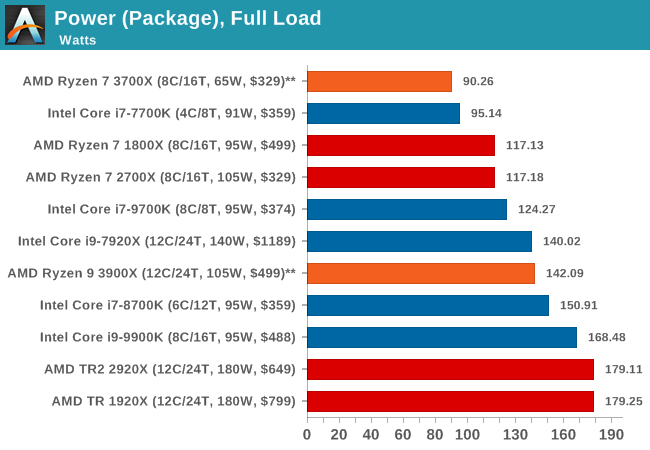
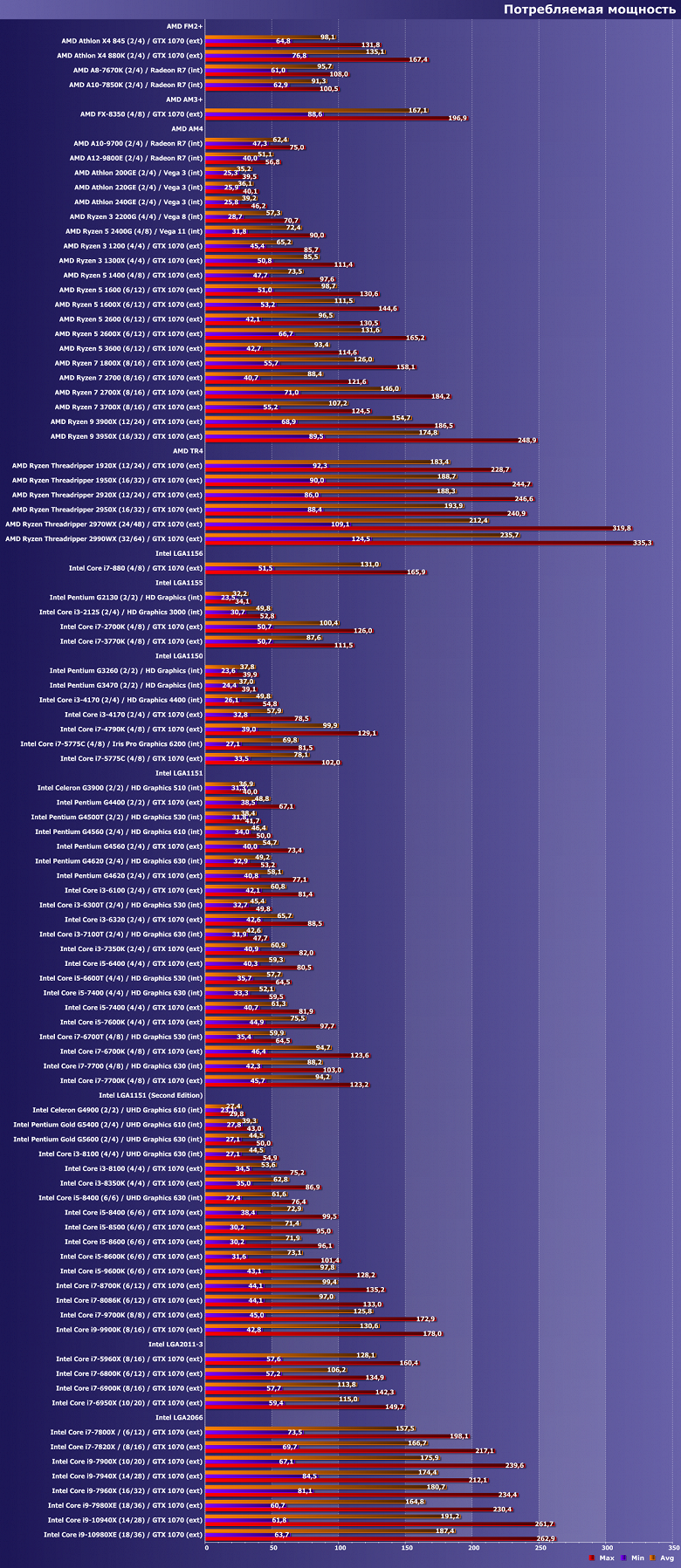
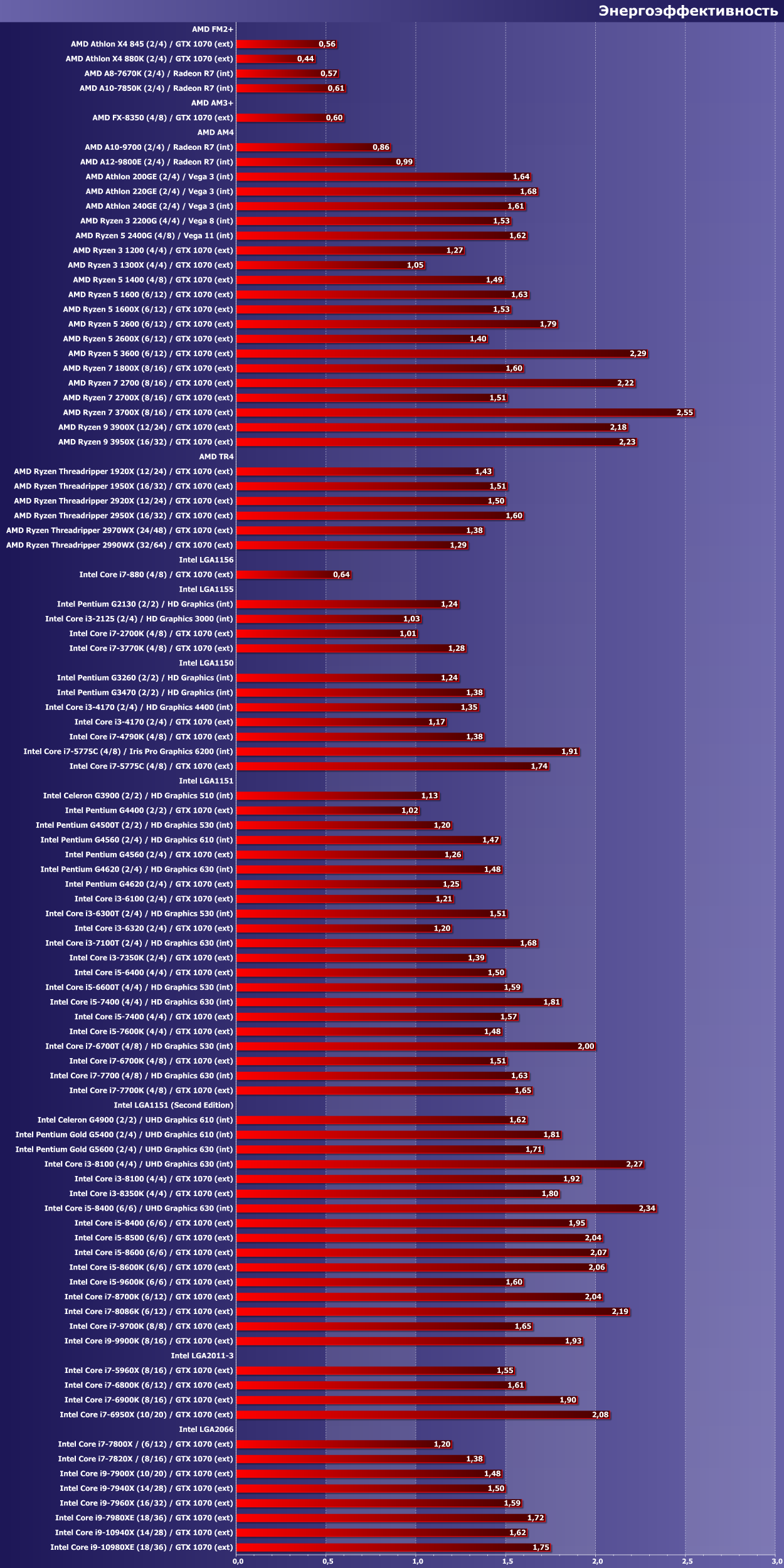
Those numbers should feature prominently alongside the 65W figure.
It does not look good for Intel at the moment.